Showing posts with label LA. Show all posts

Tuesday, December 16, 2008

May I Have a Word With You?

Language Arts/English teachers: You'll want to explore Lexulous (formerly Scrabulous, a game based on the commercial board game Scrabble). Lexulous is an addictive online word game that educators, pupils, parents, and others can use to build and hone vocabulary and spelling skills. To play Lexulous, participants generate words with a given set of letters (not unlike Scrabble). If you're hesitant about registering for an account, play the game in practice mode to get a feel for the action.

On a related note, Kotaku is reporting that Hasbro is dropping its copyright infringement lawsuit against the makers of Scrabulous.

Wednesday, November 12, 2008

C'mon, Baby, Let's Do The (Text) Twist

My nephew (who has just started blogging) shared a nifty little game that helps him with his spelling. The game is called Text Twist. I doubt anyone will be able to access it from school but hopefully, folks will give it a whirl when they get home. It's addictive.


Related links: Here are a few other linguistic links that word-lovers will appreciate.

Monday, September 22, 2008

Well Read? If Not, ReadTheWords!

Many student learn by listening. They like to have information read to them. There's a nifty resource that this group of individuals will most assuredly want to explore. It's a free site designed to supply learners with new ways of processing written information. Known as ReadTheWords, it's a web-based tool for learning that employs Text To Speech (TTS) technology. Visitors to the site can generate a pretty impressive audio file from just about any kind of written material (for example, text taken from any Microsoft office document, Adobe PDF, txt file, or HTML document). Users supply the content and, after choosing a designated reader--the site has 15 to choose from--ReadTheWords generates a voice that reads the words aloud.


To begin using this resource, register for an account.

After registering, log in.

After successfully logging in, click on the CREATE A NEW READING button.

Give the new recording a title.

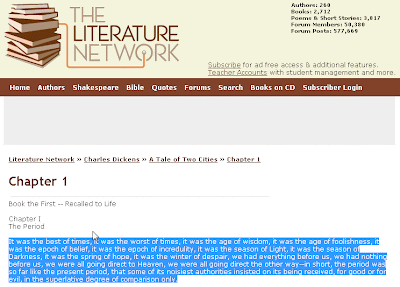
Grab some text to be read. In this case, I'm visiting The Literature Network where I've copied a chunk of the introductory chapter of one of my favorite works, A Tale of Two Cities by Charles Dickens.

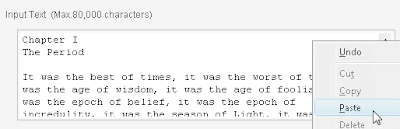
Afterward, return to ReadTheWords, and paste the text into the INPUT TEXT box.
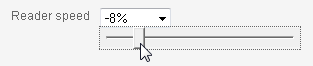
As some TTS readers are too fast for many listeners, ReadTheWords makes it possible for users to slow their digital readers down a bit.
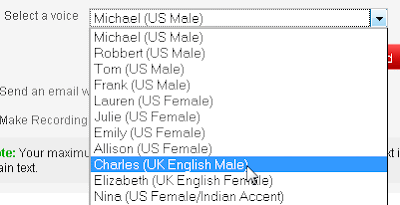
Want a British work of literature to be read by a British narrator? No problem! ReadTheWords allows users to choose a particular voice (such as Charles, a UK male).

Next, press the red READ button.

After the "recording" phase of the work is over, users see a screen that allows them to play the recorded text.
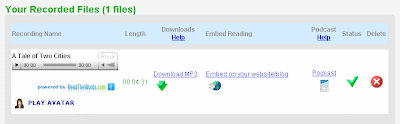
Note that users may also download an mp3 file of the text.

This is something that makes all of the effort worthwhile. Why? Notes, words from a webpage, words from any file where copying text is possible can be converted into an mp3 file. The resulting mp3 file can be loaded on an iPod or any other mp3 player. Information taht was once locked up in text can be listened to anytime the user wishes to reconnect with it. This resource gives students another means of accessing and processing content.

Yes, the voice is not a natural human voice. It does sound somewhat robotic. That said, this service is free. For many pupils who learn by listening, ReadTheWords is a no-cost way of drawing upon the strength of their particular learning style.

Monday, September 8, 2008

Have You Heard (and Seen the Word)?--Lexipedia

If you teach Language Arts, English, Writing, and/or Reading, take a few minutes to swing by Lexipedia. This nifty site is a place where "words have meaning" and it shows. Lexipedia demonstrates the fact by taking given terms and generating semantic relationships in animated word webs. This kind of tool is great for pupils who are trying to ferret the meaning on new vocabulary terms. Used in conjunction with the rich, interactive student materials at ReadWriteThink, the robust resources that Lexipedia brings into play will help both beginning and advanced learners build for better comprehension across all manner of disciplines.


Tuesday, August 26, 2008

Saving Face in Language Arts

Does the following scenario sound familiar? Imagine a classroom with an educator who wants to encourage learners to explore and experience literature. The teacher in this classroom wants to help developing readers successfully envision the characters that populate a good story or novel. Despite good intentions, the students in the class are less than enthused by the prospect of mentally constructing the attributes of the characters defined by the text being read in class. Thankfully, there's a nifty, web-based resource for Language Arts teachers who're looking for a means of engaging pupils while simultaneously checking for understanding.


Ultimate Flash Face
allows users to construct faces in a manner similar to law enforcement departments that employ skilled artists to compile sketches of crime suspects. Readers who are able to comprehend details about literary characters should be able to create a portrait of these individuals. By encouraging pupils to use Ultimate Flash Face, Language Arts teachers have a free, simple, and high-interest means of assessing students' abilities to visualize details about characters in a story.

Thursday, August 14, 2008

The Write Stuff: Text Content Analysis Tool

There are definite advantages to having students compose written assignments using a word processor. For starters, many pupils (and adults) are often reluctant to write anything with a pencil or pen because they know that, after initial editing, they’ll eventually have to reconstruct the work again and again and again. Ugh! Typing their thoughts, no matter how meager the text, saves nascent authors from the hassles and frustrations of rewriting by hand. Once aspiring writers have captured the essence of their ideas in digital form, the process for crystallizing and refining concepts becomes even more efficient. The availability of a built-in dictionary/thesaurus, ever present, ever ready to offer robust linguistic assistance makes word processing even more attractive and doable. Digital manipulation of written assignments also makes sharing drafts with teacher and peers possible and much more likely, Just ask any educator or student who has used Google Docs to benefit from the power of collaboration.

For educators who are prudent enough to allow learners to integrate technology in this manner there’s an additional perk: an online text analysis resource from UsingEnglish.com. After pasting student-generated text into the UE Text Content Analyser this useful site displays statistics such as:


:-)

Friday, August 1, 2008

I See What You're Saying


A little bird told me that Matt Cruikshank has illustrated some excellent visual interpretations of popular sayings over at his blog, the Crooked Leg. For Language Arts teachers who have access to an interactive slate/whiteboard (things like eInstruction's Interwrite Pad, Mimio, Promethean's Activclassroom materials, as well as SMART products) and a projector, this would be an excellent way to promote student engagement. After seeing Matt's examples, students could be encouraged to create their own examples. Imagine turning students loose with an interactive slate/whiteboard and tools such as Inkscape, ArtRage (use the Starter Edition for free), TuxPaint, or the GIMP.

Via an excellent post at Drawn!