Showing posts with label productivity. Show all posts

Monday, December 15, 2008

Take It Easy: J2E


Every once in a while I run across something that's educationally useful and fun to play with, too. For instance, I stumbled across a playfully powerful Java-based (word?) processor that does some incredibly spiffy stuff. Although the site is for profit, j2e is currently free for individual users and worth exploring. It's just too easy to like this resource.

Saturday, December 13, 2008

Key Resource

Hate having to access pull-down menus for features of a program? Use keystroke commands instead. Don't know the keystroke commands? No problem. KeyXL is an indispensable database of keyboard shortcuts (including shortcuts for Windows, Macintosh and Linux) that's searchable by program. Spiffy!

Wednesday, December 10, 2008

Forever Blowing Bubbles?

A few months ago, I stumbled across a service called the Awesome Highlighter. After using it in a number of classrooms, I became an immediate user and fan and posted my experience with using the tool. The service is a godsend for educators, students, and parents because it allows anyone to highlight text on web pages and subsequently receive a small link to the highlighted page. Reading a page that has been touched with the magic of the Awesome Highlighter is a quick means of zooming in on pertinent information.

Well, there's another service I'm about to add to my teaching toolbox that, like the Awesome Highlighter, will be extremely helpful to me. Bubble Comment is a (currently) free service that makes it possible for anyone to share video comments with others on just about any web page. After signing up with Bubble Comment, using the service is a simple three step process:

  1. select a web page,
  2. record a video comment, and
  3. share the video comment with others.

Spiffy!

Tuesday, November 25, 2008

Alarming News

Although many swear that gobbling turkey is a perfect recipe for post-Thanksgiving nap, the tryptophan in turkey doesn't induce drowsiness. Despite the assurances of Science, doubters remain. Those who fear an overdose of Meleagris gallopavo will cause them to snooze the day away need only check out Karen's Alarm Clock. According to Karen, anyone can...

Turn your $2,000 computer into a $20 alarm clock! Set up to five different alarm times. Wake up to a beep, any wave or MIDI file, even a track from your favorite audio CD.

Now, if we can only find out to what to do with all those leftovers...

Friday, November 14, 2008

Neat and Tidy

Many educators and students love Delicious, Diigo, and Google Notebook and use both of these productivity tools quite often. Being able to bookmark, tag, and annotate web-based resources and subsequently access them anywhere makes teaching and learning much more efficient and effective. That said, it seems that more schools would be encouraging instructors and pupils to employ and refine their use of Delicious, Diigo, Google Notebook, and related tools (i.e., services like CiteULike, Furl, LibraryThing, Ma.gnolia, Mento, Shelfari, et cetera) . After all, plenty of savvy businesses see the value in having their employees collaborate as they collect, categorize, and communicate the whereabouts of rich content. Simply put, the application of social bookmarking is a skill that 21st Century workers and leaders must possess.

Although, it doesn't really belong with social bookmarking tools, per se, it's easy to see why teachers and students will soon become infatuated with Tidy Favorites. Despite living in the age of hyper-connected content and collaborative consumers, there's still a need for private bookmarking. As archaic as the practice seems, some people still have a desire to save bookmarks on one particular computer. Those folks should check out Tidy Favorites. Why? Simple: people using Tidy Favorites can peruse their favorite personal bookmarks using an intuitive visual search engine and dashboard. True, Ma.gnolia uses pix, but what Tidy Favorites does is a little different.


As promising as Tidy Favorites is, it would be so much more robust if, like Delicious, Diigo, and Google Notebook and other tools, the content being bookmarked could be accessed via the web. The visual search feature is a killer attribute that others will probably emulate.

Thursday, July 31, 2008

Del.icio.us Gets a Tasty New Look

If you're a Del.icio.us user who hasn't done much tagging lately, you'll pleased to know that the venerable social bookmarking site has updated its look as well as its amusing URL. These days users can get to the site by surfing over to delicious.com where they'll find familiar and new features.
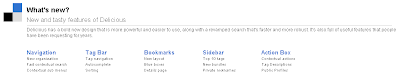
For those who've never used it, Delicious allows registered users to quickly bookmark websites. "So what? I can already do that!" you say. True enough. However, if you're bookmarking/saving to favorites on your computer, you're in for trouble. Sooner or later your computer will let you down. It's not a matter of if. It's only a matter of when. That's why Delicious and other web-based (social) bookmarking tools are so useful...*ahem* necessary these days. Delicious and its counterparts (i.e., services like Google Notebook) allow you to save, annotate, and organize web-based resources. Doing so allows you to access those resources anywhere there's an internet connection.

Think about that for a second.

If you save your favorite bookmarked sites to the web where they can be accessed, edited, and used, you're not at the mercy of one computer. That's liberating, very liberating. Having that kind of immediate access is also a time and life saver. Just ask anyone who's been called upon to share web-based resources only to discover the pc being used has crashed or otherwise been incapacitated. Being able to get to bookmarked sites (not to mention files--check out eSnips, Divshare, Secondbrain) and rapidly share them with others is a prerequisite for administrators, educators, media specialist, students, parents, and uh...really, all citizens.

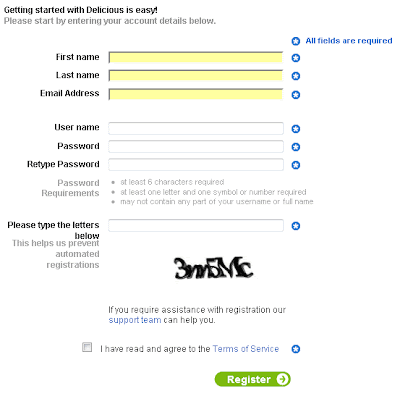
Why not register for a Delicious account? It's pretty simple. Go to the site and click on the green, Join Now button.

Enter the requested details. Make sure to check the "I have read and agree to the Terms of Service" checkbox and click on the Register button when you've accomplished the task.
Afterward, you'll need to install add the Delicious buttons to your computer.
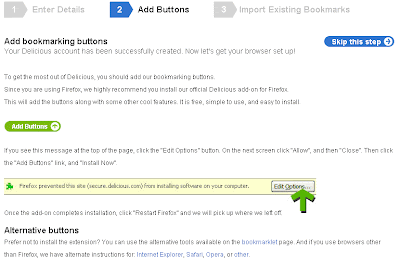
The buttons make Delicious easy to use so installing them is necessary. If you're a Firefox user, you need to click on the Add Buttons icon like so.

Don't be surprised if Firefox prevents you from immediately installing the buttons. You'll need to look at the top of the page and click the “Edit Options” (or Allow) button.

After allowing the buttons to load, you may seen a message like this:
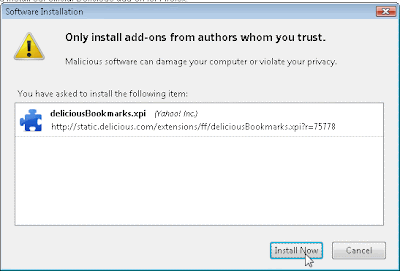
Just continue. Click the Install Now button. You'll need to restart Firefox. When you do, you'll see this in your browser.
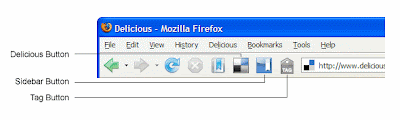
I won't go into all the specifics here because Delicious has a fabulous introduction to its bookmark buttons for Firefox. Internet Explorer fans needn't fear. There are buttons for IE users as well. Suffice it to say, these buttons will help you master your use and collection of websites. Once you've registered for a Delicious account, installed the buttons, and explored the bookmarking buttons, you'll never go back to saving websites the old-fashioned way.

Go on...take a bite and savor the flavor of efficiency and effectiveness. It's positively Delicious!

Tuesday, July 15, 2008

The Long and Short of It: TinyURL

Teachers and students like using the internet. There are some extremely useful links to frequent and integrate into classroom activities. However, excessively long web addresses are enough to dissuade both educators and pupils from sharing and making it to some very good sites. For example, a teacher in Roswell, New Mexico may chance upon an interactive map of her region. She may be very excited about referring to or otherwise using the map in a lesson. She finds the web address.

The teacher dutifully copies and pastes it into an email to a colleague or an assignment for her second period class. It looks like this when she does:

http://maps.google.com/maps?q=roswell,+nm&ie=UTF8&oe=utf-8&client=firefox-a&ll=33.426284,-104.522552&spn=0.249285,0.42572&z=11&iwloc=addr

Ugh!

Thankfully, the teacher has heard of TinyURL.

She pastes that burdensome link into the textbox at TinyURL.
After clicking on the Make TinyURL button, ta-da, her wooly web address suddenly becomes much more manageable.
The once, maddeningly long web address has been reduced to: http://tinyurl.com/5dreda, an address that is easily shared and accessed.

:-)